
 Power Point presentationDRMS BrochureUser Story (ICA)User Story (Tosco)ON/2 ImplementationStratus NewsletterMinimizing data loss
What categories do your potential disasters fit into? Natural, man-made, or technology-driven?
Disasters may come in the form of a server crash, power outage, a cut in communications cables, a fire, or natural disaster. An outage always disrupts your business, causing a loss of productivity, critical information, and loss of revenue.
Whatever the cause, you need to minimize data loss by restoring access to your files as quickly as possible and when downed servers are restored, their respective files need to be restored as well.
How do you protect your data?
The risks and devastating effects of disasters resulting in computer downtime are obvious, and always present a challenge to any business running critical applications. Business organizations demand 100% fault tolerance and continuous availability of their computing systems. Relying on traditional, full system backups means that any critical data and transactions executed after the last system backup are lost forever. The use of traditional backups also means that data at the remote site always lags behind, so that the remote computers can not be used for online production processing and can only be utilized in the course of a disaster-recovery scenario. For this reason, these vital and expensive resources are idle while the primary computer, in many cases, is over-loaded and suffering from deteriorated performance.
Do you have a business recovery plan?
In a world of real time transactions, just-in-time inventory, and supply chain dynamics, losing a phone system might wreak more chaos than a fire in the building. Today, having a Business Continuity Plan is a necessity in the eyes of many insurers, bankers, stakeholders and regulators. Audits of these plans are becoming more commonplace and comprehensive. If you think business continuity means backing up your data and creating redundant systems, then you probably need our help.
The challenge is to replicate files to a secondary machine, maintaining their availability and protection. If a server goes down, these files are readily accessible and end users can continue working with them.
|
 |
|
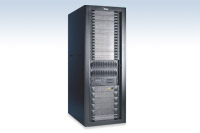
Production and Remote databases always identical |
|
|
|
 Click the image to enlarge
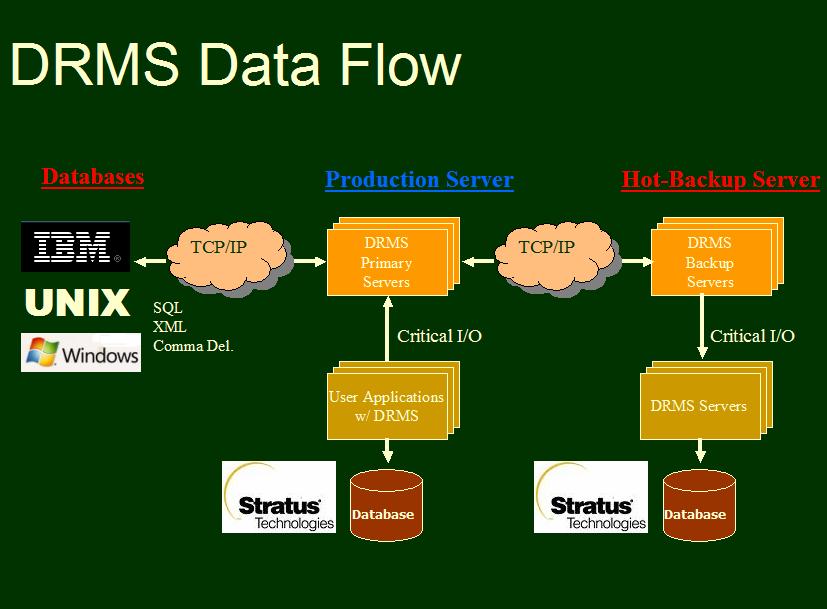
DRMS Components
Stratus/VOS To Other Platforms - Open Architecture
DRMS can be used to mirror data into any SQL databases that reside on any platform, via TCP/IP.
Based on known data layouts and user-provided templates, DRMS can convert any VOS data into standard text-only formats such as comma-delimited, XML and others. This output is then transmitted to remote ODBC databases or written to local VOS files or queues for further processing.
|
(Primary) |
|
|  (Backup) |
||
|
(Primary) |
|
|   Network Servers (Backup) |
"The DRMS product has been stable and has worked reliably since we first installed it in August 97. " Anders Carlsson, ICA
"The complete DRMS implementation took about 2 weeks. The installation of the product and the learning curve was done within only one day. Most of the time was spent on analyzing which critical files to mirror, fine-tuning our configuration and running benchmark tests." Anders Carlsson, ICA
"The product was easy to configure and implement … There is nothing more than one table to configure and we were able to do that with simple phone support." Andy Orrock, Tosco Corporation
"Performance of DRMS is terrific - data is mirrored immediately over our 1 MB pipe. We attribute much of the gain in our performance efficiency to the fact that we deployed DRMS to replace a 'homegrown' mirroring solution that was patched together by our OLTP vendor. There is no sign of page faulting. I rate that as very little overhead, considering that we're updating 2-3 files for each transaction and were running at about 14-15 TPS when I took this measurement." Andy Orrock, Tosco Corporation
"We were also surprised with the results of our performance tests. During normal system load the overhead of DRMS is not noticeable at all, and during peak time (25 transactions/per second) we've measured an overhead of no more than 5%." Anders Carlsson, ICA
DRMS Features:
Scalability
As a software-only solution, DRMS offers total configuration flexibility and scalability. Any number of modules can mirror each other. The administrator can select and identify critical data files, directories or disks -- all within DRMS' configuration. DRMS can simultaneously mirror critical data in any direction (A-to-B, B-to-A, B-to-C and so on). DRMS supports all VOS platforms and all VOS releases. Hands-off operations
DRMS is designed to run 24x7 without any human intervention. DRMS dynamically manages all aspects of error detection, handling and recovery including alternate routing and communication line switching - always utilizing the entire network bandwidth.Simplicity
DRMS requires no application changes whatsoever. It is extremely simple to learn, implement, and operate and requires no specific training. The software implementation phase can be completed within a few days, once all critical data files or directories have been identified and listed in DRMS' configuration table (DRMS uses only one TIN file!). DRMS requires no additional hardware as it utilizes existing networks and supports both TCP-IP and X.25 connections. Batch Commands
DRMS replicates VOS internal commands, such as copy_file, move_file, rename, create_file etc. so that any after-hours batch cycles and command-macros are also mirrored accurately at the remote site.Monitoring and reporting facilities
DRMS includes a robust and user-friendly administrator interface. The operator can monitor the system and all aspects of the data mirroring activities - number of I/Os, queuing operations, transaction throughput, processing rate etc. These monitors provide, at all times a great sense of control over the system. DRMS maintains and reports activities both on the system-level and on a per-file basis down to the last minute details of how many I/O operations were made on each critical file broken down by I/O type (write/update/delete etc.)Performance
Because most of the processing takes place at the target system, DRMS has practically no impact on performance of the primary (sending) computer. How does DRMS work?
During run-time, DRMS intercepts all I/O operations performed on files marked by the system administrator as "critical". After the I/O operation is completed, DRMS passes the information to the DRMS Server for transmission to the target system. The corresponding DRMS server on the target computer collects these messages and executes the I/O operation within the remote databases. The only additional work that a mirrored operation requires is sending the message to the DRMS queue. The entire operation is completed with minimal impact on the end-user's program.
