The risks and the devastating effects of disasters resulting in computer downtime are obvious and always pose a pressing issue to any business running critical applications. Business organizations demand 100% fault tolerance and continuous availability of their computing systems. Relying on traditional, full system backups means that any critical data and transactions executed after the last system backup are lost forever. The use of traditional backups also means that data at the remote site always lags behind, so that the remote computers can not be used for online production processing and can only be utilized in course of a disaster-recovery scenario. For this reason, these vital and expensive resources are idle while the primary computer, in many cases, is over-loaded and suffering from deteriorated performance.
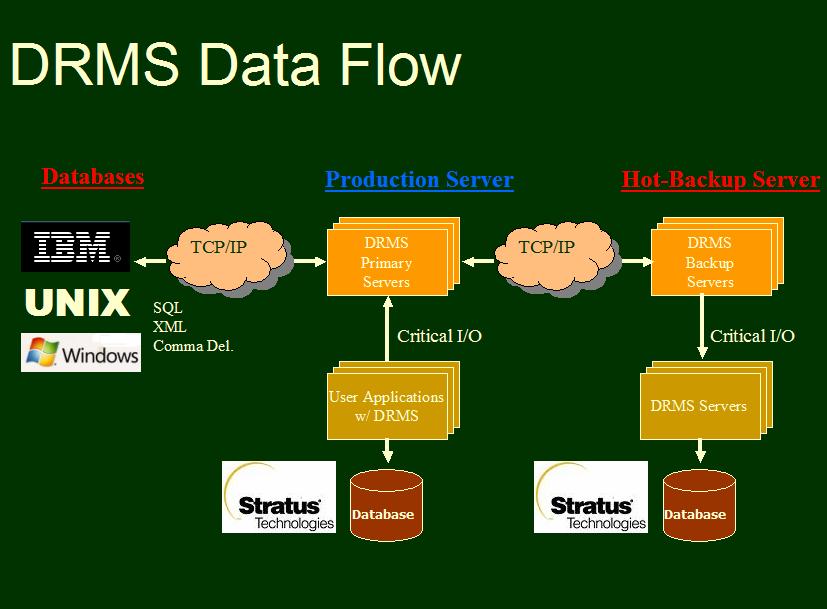
DRMS is a software solution that provides reliable, bi-directional real-time data backup and mirroring over existing Stratus networks. At any given time, all critical remote databases are identical to the primary database, which ensures rapid and reliable application recovery. Networked computers mirror each other providing flexible, scaleable load-balancing solution utilizing the full computing capacity of the hardware at both the primary and remote locations. DRMS replicates sequential, fixed, relative and stream files (including transaction-protected files) as well as, one-way-server-queue and message queues. DRMS dynamically detects and replicates newly created critical files so that no configuration changes are necessary. The internal design of DRMS puts great emphasis on protecting the business application and on preserving the primary computer's current performance. DRMS is external to the business application and requires absolutely no application or any software changes - its operation is completely transparent to the user.
There are other considerations and reasons for mirroring critical databases:
Mirroring VOS to other platforms
DRMS can be used to mirror data into any SQL databases that may reside on any platform via TCP/IP.
Based on known data layouts and user-provided templates, DRMS can be used to convert any VOS data into standard text-only formats such as comma-delimited, XML etc. Such output is then transmitted to remote ODBC databases or written to local VOS files or queues for further processing.
Scalability
As a software-only solution, DRMS offers total configuration flexibility and scalability. Any number of modules can mirror each other. The administrator can select and identify critical data files, directories or disks - all within DRMS' configuration. DRMS can simultaneously mirror critical data in any direction (A-to-B, B-to-A, B-to-C etc.). DRMS supports all VOS platforms and all VOS releases.
Hands-off operations<
DRMS is designed to run 24x7 without any human intervention. DRMS dynamically manages all aspects of error detection, handling and recovery including alternate routing and communication line switching - always utilizing the entire network bandwidth.
Simplicity
DRMS requires no application changes whatsoever. It is extremely simple to learn, implement and operate on a daily basis and requires no specific training. The implementation phase of the software can be completed within a few days, once all critical data files or directories have been identified and listed in DRMS' configuration table (DRMS uses only one TIN file!). DRMS requires no additional hardware as it utilizes existing networks and supports both TCP-IP and X.25 connections.
Batch Commands
DRMS replicates VOS internal commands, such as copy_file, move_file, rename, create_file etc. so that any after-hours batch cycles and command-macros are also mirrored accurately at the remote site.
Monitoring and reporting
The operator can monitor the system and all aspects of the data mirroring activities - number of I/Os, queuing operations, transaction throughput, processing rate etc. These monitors provide, at all times great sense of control over the system. DRMS maintains and reports activities both on system-level as well as on a per-file basis down to the lowest details of how many I/O operations were made on each critical file broken down by I/O type (write/update/delete etc.)
Performance
Since most of the processing takes place at the target system, DRMS has practically no impact on performance of the primary (sending) computer.
How does DRMS work?
During run-time, DRMS intercepts all I/O operations performed on files marked by the system administrator as "critical". After the I/O operation is completed, DRMS passes the information to the DRMS Server for transmission to the target system. The corresponding DRMS server on the target computer collects these messages and executes the I/O operation within the remote databases. The only additional work that a mirrored operation requires is the sending of the message to the DRMS queue. The entire operation is therefore completed with minimal impact on the end-user's program.
Introduction
Today's sad news is that the disasters of the 20th century seem somehow comforting in the face of disasters from the 21st. We know we can survive the tragedies, the question is how to survive the mess.
Disasters may come in the form of a server crash, power outage, a cut in communications cables, a fire, or natural disaster. An outage always disrupts your business, causing a loss of productivity, critical information, or worse, a loss of revenue. Whatever the cause, you need to minimize data loss by restoring access to your files as quickly as possible and when downed servers are restored, their respective files need to be restored as well.
| s$add_item | s$add_key | s$attach_port | s$close |
| s$control | s$create_allocated_file | s$create_delete_record_index | s$create_file |
| s$create_index | s$create_record_index | s$delete_file | s$delete_index |
| s$delete_item | s$delete_key | s$detach_port | s$enforce_region_locks |
| s$get_item | s$keyed_delete | s$keyed_lock_record | s$keyed_position |
| s$keyed_position_delete | s$keyed_position_read | s$keyed_position_rewrite | s$keyed_read |
| s$keyed_rewrite | s$keyed_unlock_record | s$keyed_write | s$keyed_write_unlock |
| s$lock_file | s$lock_region | s$msg_open | s$msg_send |
| s$notify_path | s$open | s$read_raw | s$rel_delete |
| s$rel_lock_record | s$rel_position | s$rel_position_delete | $rel_position_read |
| s$rel_position_rewrite | s$rel_read | s$rel_rewrite | s$rel_unlock_record |
| s$rel_write | s$rel_write_unlock | s$rename | s$seq_delete |
| s$seq_lock_record | s$seq_open | s$seq_position | s$seq_position_delete |
| s$seq_position_read | $seq_position_rewite | s$seq_read | s$seq_rewrite |
| s$seq_unlock_record | s$seq_write | s$seq_write_partial | s$seq_write_unlock |
| s$set_expiration_date | s$set_file_allocation | s$set_implicit_locking | s$set_pipe_file |
| s$set_safety_switch | s$truncate_file | s$truncate_open_file | s$unlock_file |
| s$unlock_records | s$write | s$write_code | s$write_partial |
| s$write_partial_code | s$write_raw | s$write_wrap | s$write_wrap_indent |
| s$write_wrap_partial | s$set_transaction_file | s$start_transaction | s$start_priority_transaction |
| s$commit_transaction | s$abort_transaction | s$copy_file | s$clone_file |
| record_type |
Choose one of the following values:
The PRIMARY and BACKUP processes handle all the communications aspects; APPLICATION process(es) apply the mirrored I/O on the backup machine.
| ||||||||||||||||||||||||||||||||||||||||||||||||||||||||||||||||
| run_on_module | The module name on which the process will run. The 'start_servers' request (documented later) will scan the control table and start all processes belonging to the current-module | ||||||||||||||||||||||||||||||||||||||||||||||||||||||||||||||||
| priority | The priority under which the process will be started. | ||||||||||||||||||||||||||||||||||||||||||||||||||||||||||||||||
| tcp_host | The IP address of the Backup system. For more information on TCP-IP configuration, see VOS TCP System Administration Guide. | ||||||||||||||||||||||||||||||||||||||||||||||||||||||||||||||||
| tcp_port | The port number that will be used by the TCP connection. For more information on TCP-IP configuration, see VOS TCP System Administration Guide. | ||||||||||||||||||||||||||||||||||||||||||||||||||||||||||||||||
| max_buffer_len | Specifies the maximum size allocated for application I/O buffers. | ||||||||||||||||||||||||||||||||||||||||||||||||||||||||||||||||
| primary_call_timeout | Specifies that time, in seconds between each re-connection attempt by the Primary Server. | ||||||||||||||||||||||||||||||||||||||||||||||||||||||||||||||||
| max_file_errors | A number I/O errors allowed for each mirrored file. The HotBackup Server keeps track of all file I/O errors for each file. When the number of I/O errors exceeds the max_fille_errors threshold, error logging will be stopped. | ||||||||||||||||||||||||||||||||||||||||||||||||||||||||||||||||
| log_statistics_on_close |
A yes/no switch indicating whether the system administrator is interested in transaction counts and statistics when files are closed. The DRMS server accounts for every system call (s$). When an application closes its files the Server is capable of reporting which calls were executed and how many times. This is useful and valuable information for capacity planning or application troubleshooting. The DRMS servers use a daily log (with a date extension) in the logs directory:
tp_abort_timeout |
Tp_abort_timeout is used only by the HotBackup software with applications that are using Transaction Protection. In the case that the transaction aborts, it specifies the time in 1/1024 seconds of wait time before attempting to re-apply the transaction.
| substitute_system_name |
Use this field to enter the name of the backups system. You should use this field ONLY if both the primary and backup systems are identical in their disk configuration. This feature will allow to leave the destination_dir empty and DRMS will substitute the primary system name with the backup system name. | Example: The primary system is %prim#m1. The backup system is %back#m1 (and =substitute_system_name is set to 'back'...and in drms_files.tin we have the following entry:
/=record_type       include
 =process_name      *
 =source_path       %prim#d03>PROD>data>my_critical_file
....then, the destination (mirrored) file will be set to: %back#d03>PROD>data>my_critical_file appl_show_stats |
When this switch is set, the application program will write file-level statistics to the [application].drms file. The information will include which files were used and a how many times each s$ call was used.
| appl_mirror | _default_output
In most cases it is not necessary to mirror the application's default output file on the Backup system. Default output files are typically temporary *.out files that are created when the process is started. The DRMS software is capable of mirroring these files as well. To activate this feature, set the variable to "1".
| appl_send_alerts | _to_25th_line
When set, the DRMS servers will forward errors to the operator's terminal (25th line message). Major DRMS-Server problems will be reported regardless of the setting of this switch. This switch should never be used in Production.
| appl_send_alrets | _to_syserr_log
When set, the DRMS servers will forward errors to the daily syserr_log file. This governs only application level alerts. Major DRMS-Server problems will be reported regardless of the setting of this switch. This switch should never be used in Production.
| check_file_at_open, check_file_at_close |
When set, DRMS will compare file information when the file is opened or closed to assure that files on the primary and backup systems are equal in size, number of records, number of bytes, and indexes.
| check_file_interval |
When set, DRMS will compare file information at the specified interval. Interval is specified in minutes.
| use_tp |
A yes/no switch indicating whether the backup system should use TPF. This is used only to disable and bypass TP. Consult with your software provider before changing the default value.
| appl_q_timeout |
A timeout interval in seconds set on the DRMS_Backup_App server queue. Consult with your software provider before changing the default value.
| primary_max_buffers |
The number of buffers DRMS_Primary servers use for their internal recovery algorithm.
| appl_max_buffers |
The number of buffers DRMS_Backup_App servers use for their internal buffering algorithm. Consult with your software provider before changing the default value.
| user_application | _q_timeout
The timeout set in seconds on the DRMS_Primary queue. Consult with your software provider before changing the default value.
| use_yield_processor |
Used to assure proper sequencing in a high-load system. Consult with your software provider before changing the default value.
| sort_buffer |
Used to adjust the internal sorting algorithm. Consult with your software provider before changing the default value.
| no_of_queues |
The number of queues to be used on the Primary system between the user application and the DRMS Primary servers. By default, DRMS uses fast one-way server queues with a depth of depth of 32,767 messages for each queue. You can also use a slower message queue with unlimited queue depth that will allow you to accumulate messages up to the disk-space capacity by setting the no_of_queues to -1.
| replace_special_chars |
Used only by DRMS/Extractor while building XML data. Special characters are replaced as follows: |
qmon_warn_at |
DRMS checks the total number of pending message every 5 minutes. If this number exceeds the qmon_warn_at threshold, a warning will be recorded and this check will be performed ever 2 minutes until the pending count drops below the specified threshold. To disable this feature, set the threshold to zero.
| disable_drms |
Set this switch if you need to run the system without data mirrorig.
| resume_at_q_depth |
See note below on keep-trying.
| keep_trying |
if for any reason the Primary DRMS server is stopped, you have two options: |
trace_level |
Use any of the following values: |
|
Programs that access critical files in a read-only mode do NOT require any mirroring and should be excluded from this activity.
Configuration example using a single queue
/=record_type         GLOBAL_SETTINGS
 =tcp_host            0.0.0.0  /* IP of the Backup!!*/
 =tcp_port            5000
 =max_buffer_len      8192
 =queue_threshold     15000
 =no_of_queues        1
 =appl_max_buffers    1000
 =sort_buffer         400

/=record_type	    PRIMARY
 =run_on_module       (current_module)
 =use_queue_no         1

/=record_type          BACKUP
 =run_on_module        current_module)

/=record_type          APPLICATION
 =run_on_module       (current_module)
The DRMS Files Table (drms_files.table)
This drms_files.table identifies critical applications and files. To create the control table, execute the create_table command using the drms_files.dd data definition file. Note that the table is designed so that it could be used as a centralized, system-wide definition shared by all applications.
organization:  	relative;
fields      :
record_type         char (32) var  default ('include'),
process_name        char (32)  var,
source_path         char (256) var,
destination_dir     char (256) var,
drms_server	  bin (15),
in_any_directory    bit 1,
auto_synchronize     bit (1)
dont_send_reads      bit (1)
extractor_file_id   bin (15),
equalize_interval   char (32) var,
equalize_if_new     bit (1),
equalize_if_modified bit (1),
equalize_if_locked   bit (1),
report_orphans       bit (1),
delete_orphans       bit (1),
end;
Field Definitions
| record_type |
The configuration supports three types of records: include This is the default record_type. It is used to specify which applications (processes) and files are critical. PROGRAMS THAT ONLY READ CRITICAL FILES SHOULD NOT BE INCLUDED IN ANY MIRRORING ACTIVITIES. For this reason, the DRMS configuration layer requires both process-name AND a file-name. Star-names can be specified in the process_name and in the source_path fields. Example #1: To include all processes that use MainTxnFile:
/=record_type    	include
=process_name   	*
=source_path 	[production-dir>MainTxnFile
=mirroring_dir  	[hot-backup-directory]
/=record_type    	include
=process_name   	TradeProcessor*
=source_path 	[production-dir]>MainTxnFile
=mirroring_dir  	[hot-backup-directory]
exclude Exclude is used to exclude certain processes or files from any mirroring activities. Star-names can be specified in the process_name and in the source_path fields. Example #1: Do not perform ANY mirroring for the ReportTxn program:
/=record_type    	exclude
=process_name   	ReportTxn
=source_path 	[production-dir]>MainTxnFile
=mirroring_dir  	[hot-backup-directory]
Example #2: Exclude LogFile from ANY mirroring activities:
/=record_type    exclude
=process_name   *
=source_path    [production-dir]>LogFile
Note that in the case of DRMS/Equalizer, the exclude records apply to the entire system regardless of the directory portion of =source_path. In the following example, DRMS/Equalizer will skip all *kp file regardless of their location:
/=record_type    exclude
=source_path    *.kp
equalize These are optional records. They are used by the EQUALIZER process. Include data files that are not related to the application's database. Such files can include any source files or configuration files that are typically changed by the editor (tin,dd,pl1,form,cobol, cm,pm,table etc.) |
| process_name | This table is designed to be centralized and by all applications. The application must be identified by a process name. For programs running in the background, use the process_name (see the start_process command). For interactive programs, use the program name (without the .pm) extension. Note that star-names are supported, for example, you may use: EditServer_*. |
| source_path | The full/relative path name of the critical file on the Primary module. Note that you can use star-names (tlf* etc.). |
| destination_dir | The full/relative path name of the directory on the Backup module to where mirroring will be performed. |
| drms_server | Identifies the Application server on the Backup machine that will process file I/O activities. |
| in_any_directory | When set, the =source_path will include only a file name (or star-name) and DRMS will look for such file(s) REGARDLESS of their directory location. This feature should be used primarily if you have only one set of critical file and may wish to periodically move your database around without having to change the full path name (=source_path) in this table. However, you should use it with some caution: If your program uses the same file under different directory, DRMS will attempt to mirror all activities to only one file specified in =mirroring_dir (which will create errors). This consideration does not apply if your systems have identical disk structure are you are using the =substitute_system_name feature in drms.dd's GLOBAL_SETTINGS record. |
| auto_synchronize | This option applies only to s$keyed_rewrite. When set, and if the s$keyed_rewrite fails, then DRMS will attempt to "fix" the file by executing s$keyed_write. This feature may be used to build and fix indexed files that have not been synchronized. |
| dont_send_reads |
This option applies to applications that do not update critical files with s$seq_rewrite or s$seq_delete. Such applications normally update the files with Keyed (s$keyed___) operations and therefore do not need to pass all Read operations (s$seq_read, s$keyed_position etc.) to the backup side. Using this option may save significant network overhead. If dont_send_reads is set then the following s$ calls will not be mirrored:
|
| extractor_file_id |
A non-zero, the extractor_file_id is used to identify the layout and Template(s) for the file(s):
|
| equalize_interval | A time interval in minutes used to specify how often DRMS should check for modified or newly created files. This setting applies only to records used by the EQUALIZER process (=record_type EQUALIZE). |
| equalize_if_new | If equalize_if_new is set (to 1), DRMS will synchronize files that exists within the source-path's star-name but do NOT exist in the mirroring directory. |
| equalize_if_modified | If equalize_if_modified is set (to 1), DRMS will synchronize files that exists both within the source-path's star-name and in the mirroring directory but the version on the Primary module has been modified and is more recent. |
| equalize_if_locked | If equalize_if_locked is set (to 1), DRMS will synchronize files that are locked. By default, files that are being used (locked) by the application are not equalized. |
| report_orphans | Used only by DRMS/Equalizer. When set, any directories and/or files that remain under the destination directory but no longer exist on the primary module will be reported in the DRMS/Application log file. |
| delete_orphans | Used only by DRMS/Equalizer. When set, any directories and/or filesthat remain under the destination directory but no longer exists on the primary module will be deleted. |
recover_servers
Starts all DRMS servers as defined in the drms.table file while recovering all active ports recorded in the Checkpoint file.
Click to enlarge:
Any valid unique-indexed data file which is defined as a critical file within the drms_file.tin configuration. You can also use a star-name.
-index
Use this option only if the file is encrypted using the Encryptor software to specify the name of a non-duplicates index name.
You should be able to complete this basic test within a few minutes.
Note that this initial test should be completed without having to change any of the configuration files.
Add your application's critical processes and files to the DRMS configuration table (drms_files.tin). Make sure that files selected for mirroring exist on the Backup module and are identical to the files on the Primary module. Use the compare_files command for this purpose. If necessary, use the copy_file or create_file commands to complete the Backup set of files.
Modify the drms.table to include your own communication configuration IP address and the port number.
You are now ready to start the DRMS servers on both modules - click on start-servers.
You'll need to wait a few seconds until all processes are started and connect to each other. You should expect a message on you terminal's 25th line announcing that a connection was established.
Once connected, you'll be ready to start your application processes.
Supported system calls
The following system calls are supported by DRMS/Extractor:
A complete Example
In this example we will create treat the standard VOS (master_disk)system>error>error_codes.table as a critical file and mirror it using the SQL format.
If you make configuration changes, it is not required to start and restart the DRMS servers - ONLY THE APPLICATION must be restarted.
DRMS must be up and running BEFORE THE APPLICATION IS STARTED. DRMS' Administration
DRMS' admnistration can be done via the WEB interface (via Alert-Manager's DRMS tab) of from the VOS command-line.
start_servers
Starts all DRMS servers as defined in the drms.table file while ignoring the Checkpoint file. 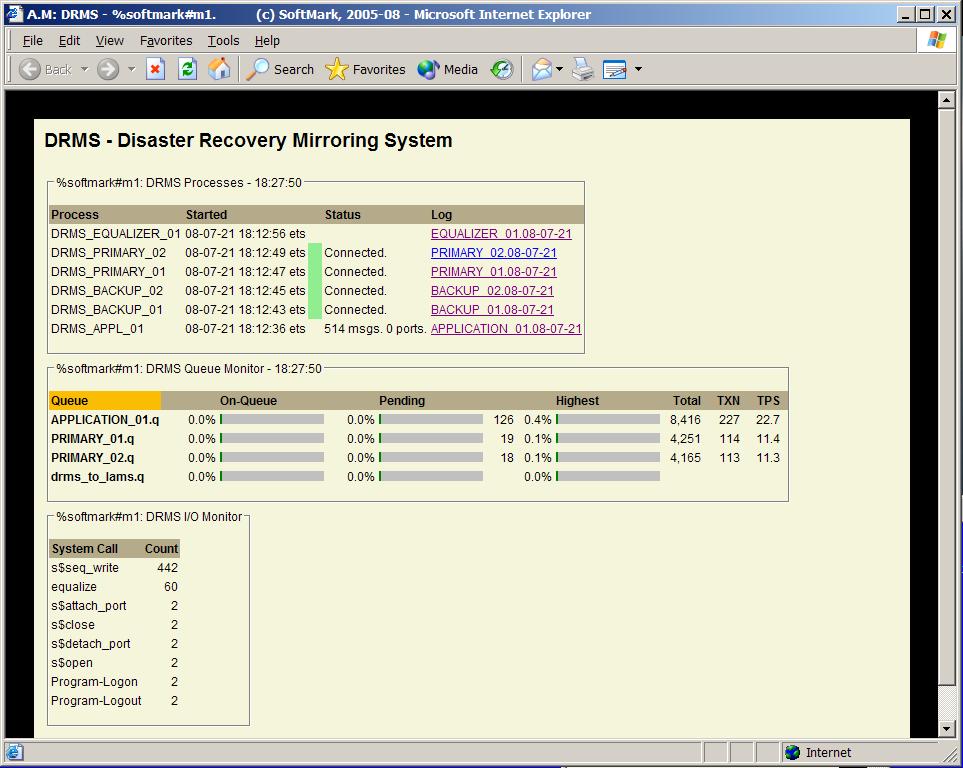
Purpose
The drms_sync command is used to syncronize large data file without having to copy these files to the backup system.CRT Form
---------------------------------- DRMS Sync.  --------------------------------
 files:
 -index
Lineal Form
drms_sync.pm [files] -index [index-name]
Arguments
filesRunning the DRMS_DEMO Application
The DRMS software includes a sample application (drms_demo.pm) that can be used to demonstrate data mirroring and for throughput and benchmark testing. The drms_demo.pm program included with its source code performs a basic copy_file function. It accepts a source and a destination file name as arguments and then reads the source file and writes it to the destination file. Make sure that the file selected as the destination file is identified as a critical file (see the drms_files.tin file). The goal is to mirror the destination file which is identified as a critical file on the Backup module. When the program completes, use the compare_files command to validate the results.
Getting Started
The SPS>DRMS directory must be added to your COMMAND and OBJECT library paths as follows:
You will need to re-bind all your application program-modules to include the drms_routines.obj object. Note that since you've added the DRMS path, it is not necessary to make any changes to your bind control files.
file.NNN
An empty clone of the mirrored file which is used by DRMS to extract file format and information about the files indexes. To create this file, simply copy the original file and truncate it.
layout.NNN
This is a standard Data Description (dd) file used by DRMS/Extractor to extract the data from the original buffer and build the proper outputs.
template.NNN
One or more Templates used to format the output messages. For XML formats, only one Template is used, for SQL formats, three Tempaltes are used.
 File-Extractor-ID(s) 1-99 are reserved for XML formatted outputs where IDs higher than 100 are normally used to create SQL statements and therefore require three different Templates - for INSERT, UPDATE and DELETE (template.NNN.i, template.NNN.u, template.NNN.d)
SQL by its nature require in most cases one or more indexes. Therefore files used for SQL conversion must be opened for update in indexed mode and all operations must be perfumed by s$keyed_xxx operations. Sequential writes are updates are supported but sequential updates and deletes are not.
File-Extractor-ID(s) 1-99 are reserved for XML formatted outputs where IDs higher than 100 are normally used to create SQL statements and therefore require three different Templates - for INSERT, UPDATE and DELETE (template.NNN.i, template.NNN.u, template.NNN.d)
SQL by its nature require in most cases one or more indexes. Therefore files used for SQL conversion must be opened for update in indexed mode and all operations must be perfumed by s$keyed_xxx operations. Sequential writes are updates are supported but sequential updates and deletes are not.
s$keyed_delete
s$keyed_position_rewrite
s$keyed_rewrite
s$keyed_write
s$keyed_write_unlock
s$rel_write
s$rel_write_unlock
s$seq_write
s$seq_write_unlock
/=record_type            include
 =process_name           *
 =source_path            error_codes.data
 =destination_dir        mirroring_dir
 =extractor_file_id      200
!copy_file (master_disk)system>error>error_codes.table DRMS>layouts>file.200 -truncate
fields: err_number		fixed bin (15),
        err_name        	char (32),
        err_text           char (128) varying,
        err_category    	char(18),
        err_category2   	char(18);
end;
VOS standard date-time fields must be defined as defined as fixed-binary-31 and the field name must be preceded with 'dt_'. For example: dt_last_update bin (31),
drms_demo.pm -input_path #d01>system>error>error_codes.table -output_path error_codes.data
Mirroring VM Regions
You may use DRMS to replicate your application's VM regions. Here's what you'll need to do:
/=record_type                                SYNCHRONIZE_VM
 =run_on_module                              [your-production-module]
Troubleshooting
If for some reason you are not getting the expected results, check:
The DRMS_DEMO Program
drms_demo: proc;
/*  +++begin copyright+++ *******************************  */
/*                                                         */
/*  SoftMark Inc. CONFIDENTIAL INFORMATION                 */
/*  COPYRIGHT (c) 1989 -1993 SoftMark, Inc.                */
/*  All Rights Reserved.                                   */
/*                                                         */
/*  This  program  contains  confidential and proprietary  */
/*  information  of  SoftMark, Inc. and any reproduction,  */
/*  disclosure, or use in whole or in  part is  expressly  */
/*  prohibited, except as may be  specifically authorized  */
/*  by prior written agreement or permission of SoftMark.  */
/*                                                         */
/*  +++end copyright+++ *********************************  */

/***********************************************************************/
/*  Description: This is a sample application used to demonstrate      */
/*               the DRMS-Data Mirroing System.                        */
/*                                                                     */
/*               The program accepts 2 arguments: an input-file and    */
/*               an output-path. The program reads all records in the  */
/*               input file and writes them to the output file.        */
/*               The program can therfore be describled as a simple    */
/*               version of the "copy_file" command.                   */
/*                                                                     */
/*               The default name for the Output file is "test_file"   */
/*               which also appears in the sample configuration (see   */
/*               the drms_files.tin file).                             */
/*                                                                     */
/*               For more details, please refer to the:                */
/*                                                                     */
/*                    DRMS - Installation Guide                        */
/*                                                                     */
/***********************************************************************/
%include 'system_io_constants.incl.pl1';
declare  s$error entry(fixed bin(15), char(*) varying, char(*) varying);
dcl s$parse_command  entry (char (*) var,bin(15),
                            char (*) var,char (256) var,
                            char (*) var,char (256) var,
                            char (*) var);
declare  s$write entry(char(*) varying);
declare  s$seq_write entry(fixed bin(15), fixed bin(15), char(*), fixed
          bin(15));
declare  s$attach_port entry(char(32) varying, char(256) varying, fixed
          bin(15), fixed bin(15), fixed bin(15));
declare  s$open entry(fixed bin(15), fixed bin(15), fixed bin(15), fixed
          bin(15), fixed bin(15), fixed bin(15), char(32) varying, fixed
          bin(15));
declare  s$seq_read entry(fixed bin(15), fixed bin(15), fixed bin(15),
          char(*), fixed bin(15));
declare  s$close entry(fixed bin(15), fixed bin(15));
declare  s$detach_port entry(fixed bin(15), fixed bin(15));
declare  s$stop_program entry(char(*) varying, fixed bin(15));

dcl 1 parse,
      2 input_path       char (256) var,
      2 output_path      char (256) var;

dcl record_buffer        char (4096);
dcl in_port              bin  (15);
dcl out_port             bin  (15);
dcl rec_len              bin  (15);
dcl caller_name          char (32) var static init ('drms_demo');
dcl code                 bin  (15);
dcl records              bin  (31);
dcl e$end_of_file        bin  (15) static ext;


call s$parse_command   (caller_name,code,
    'option (-input_path),pathname,req,=''(home_dir)>abbreviations''',
               parse.input_path,
    'option (-output_path),pathname,req,=test_file',parse.output_path,
    'end');
if code ^= 0  then stop;

call s$write ('Starting DRMS-DEMO.');
call s$write ('Copying ' || parse.input_path);
call s$write ('     To ' || parse.output_path);

/*
 *   Opening the Input file.
 */
call s$attach_port ('',parse.input_path,0,in_port,code);
if code ^= 0 then call error ('Problem opening input file.');

call s$open (in_port,SEQUENTIAL_FILE,0,
      DIRTY_INPUT_TYPE,IMPLICIT_LOCKING,SEQUENTIAL_MODE,'',code);
if code ^= 0 then call error ('Problem opening input file.');

/*
 *   Opening the Output file.
 */
call s$attach_port ('',parse.output_path,0,out_port,code);
if code ^= 0 then call error ('Problem opening output file.');

call s$open (out_port,SEQUENTIAL_FILE,0,
      OUTPUT_TYPE,IMPLICIT_LOCKING,SEQUENTIAL_MODE,'',code);
if code ^= 0 then call error ('Problem opening output file.');

records = 0;
call s$seq_read (in_port,length (record_buffer),rec_len,record_buffer,code);
do while (code = 0);
   records = records + 1;
   call s$seq_write (out_port,rec_len,record_buffer,code);
   if code ^= 0 then call error ('Problem writing to output file.');
	call s$seq_read (in_port,length
            (record_buffer),rec_len,record_buffer,code);
end;
if code ^= 0 & code ^= e$end_of_file
then
   call error ('Problem reading the input file.');

/*
 *   Closing files.
 */
call s$close (in_port,code);
if code ^= 0 then call error ('Problem closing input file.');
call s$detach_port (in_port,code);
if code ^= 0 then call error ('Problem closing input file.');

call s$close (out_port,code);
if code ^= 0 then call error ('Problem closing output file.');
call s$detach_port (out_port,code);
if code ^= 0 then call error ('Problem closing output file.');

call s$stop_program ('', (0));

error: proc (a_text);
  dcl a_text        char (*) var;

  call s$error (code,(caller_name),(a_text));
  call s$stop_program ('',code);
end error;
end drms_demo;
Important Operation considerations
Preparations
Critical files must exist on the backup directory before starting the system. In most cases, it is required that critical files are identical on both Primary and Backup module before starting the system. There's no need to create files that are created dynamically dynamically by the application (like files with a "date" extension), these files will be created by DRMS.