
 Secure Your Operations (article)Access Control ManagerActivity ReportUser Testimonial (AOL)
Secure Your Operations (article)
Access Control Manager
Activity Report
User Testimonial (AOL)
Introduction
The SPS/VOS Security Shell eliminates unrestricted access to VOS and greatly enhances operators' and developers' productivity. Any operator, even with no Stratus experience, can become proficient and operate the system safely. The SPS/Security Shell is an indispensable environment for any mainframe trained personnel.
 SPS- Security Diagram SPS- Security Diagram
|
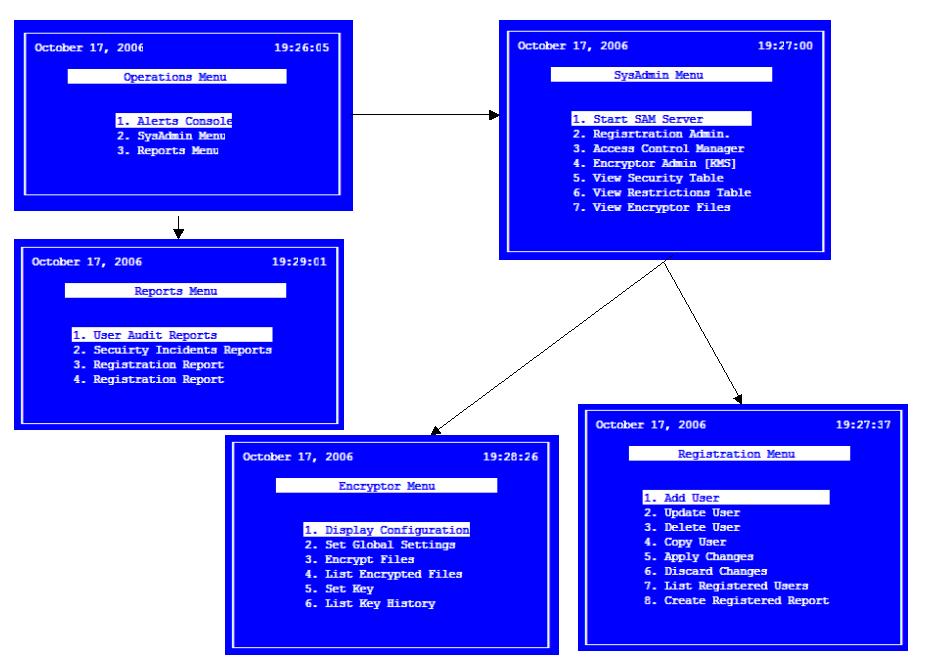 Example of a Menu-ed structure Example of a Menu-ed structure
|
|
| Eliminates the need to register privileged users |
|
| Allows non-privileged users to execute selected subsets of analyze_system requests and other privileged commands |
|
| Incorporates the Security Layer shielding the system from unauthorized use |
|
| Produces a comprehensive audit trail log of all commands executed on the system; records the time and user's identity |
|
| Keeps track of operator's activity and allows the user to restore and reuse commands and path names used previously during the session |
|
| Features a standard DES-based file encryption facility |
|
| Provides process listings (list_users) sorted by CPU utilization, I/O rate, Page faults memory usage and Interrupt rates |
|
| Supports user-programmable function keys for frequently used commands |
|
| Authorizes command execution based on user's security profile |
|
| Allows access of non-privileged users to selected privileged commands and to subsets of analyze_system requests thereby eliminating the need for privileged users registration |
|
| Ensures execution of commands from the correct, designated terminals |
|
| Ensures that commands are executed within the allowed timeframes |
|
| Blocks access to restricted modules, systems and devices (production) |
|
| Handles security violations; posts warning messages in the system error log and terminates the violator's session |
|
| Manages, monitors and enforces directory and file access (ACL/DCL), employing a simple to operate, system-wide configuration |
|
| Generates complete activity and security violations logs and reports date, time, user's identity, command executed and relevant violation information |
The system greatly enhances system security by adjusting and generating menus on a per-user basis according to the individual's security profile.
The SPS/Menu System provides complete audit trail logs of all system and operator activities including security violation attempts detailing commands executed, user names and the time of execution.
| Automatically generates box-type menus with unlimited chains of sub-menus |
| Requires no programming or technical skills |
| Integrates existing applications into professional looking, uniform and consistent interfaces |
| Supports single-key transfers between applications |
| Features the Security Layer and offers additional facilities such as: Browser, Calendar and Disk Space |
| Supports user programmable function keys for frequently used commands |
| Produces a comprehensive audit log of all commands executed, users' identity, date and time of each event |
| Features the IDG layer (Intelligent Document Generator) that translates menu configurations into full-length documents |
| Provides a configurable on-line help facility linking menu items to existing documentation files |
| Reduces dramatically risk of human error, cost of documentation and training expenses |
SPS Menus vs. Command Macros
There is a lot of added value in using the SPS solution compared with command macros. With minor effort (yes, we can help!) you can convert your macros into easy-to-maintain tables. SPS menus are all table driven, easy to maintain and generated dynamically ("on the fly") based on user's security profile. In comparison, command macros are fixed for all users, require development and testing time, and lack many other features such as detailed audit trail reporting, on-line help and documentation.
| Command Macros | SPS Menus |
| Require development and testing | All table driven, easy to maintain. Menus are generated dynamically ("on the fly") |
| Menus are fixed for everyone, no "on-the-fly" adjustments and no built-in security | Adjustments of menus/sub-menus is based on user-id, time-of-day, terminal-name |
| Limited, difficult to follow traces. In many cases logging may be turned off by the operator | Robust, complete and easy to follow activity audit trail reports outlining date/time, user-name, command executed and any security violation |
| Slow interface, may provide inconsistent presentation; no external or add-on tools | Consistent, user-friendly interface including, the powerful SPS/File Browser, SPS/Calendar, "Hot Menus" and more |
| Function-keys are disabled | Programmable function keys |
| No on-line documentation | Allows on-line help/documentation for each item or sub-menu |
| Command macro processing require system resources | Extremely fast, has no performance overhead |
Frequently asked questions
Can I enforce menu-driven access only on certain operators or users?
My application has a built-in menu. Can I still use the SPS menuing solution? What would be the advantage?
We already provide our operators with menus. Our menus are driven by a set of home-grown command macros. This approach seems to work for us, how would we benefit from SPS?
Can I protect the SPS audit trail reports? How can I monitor what the System Administrator is doing?